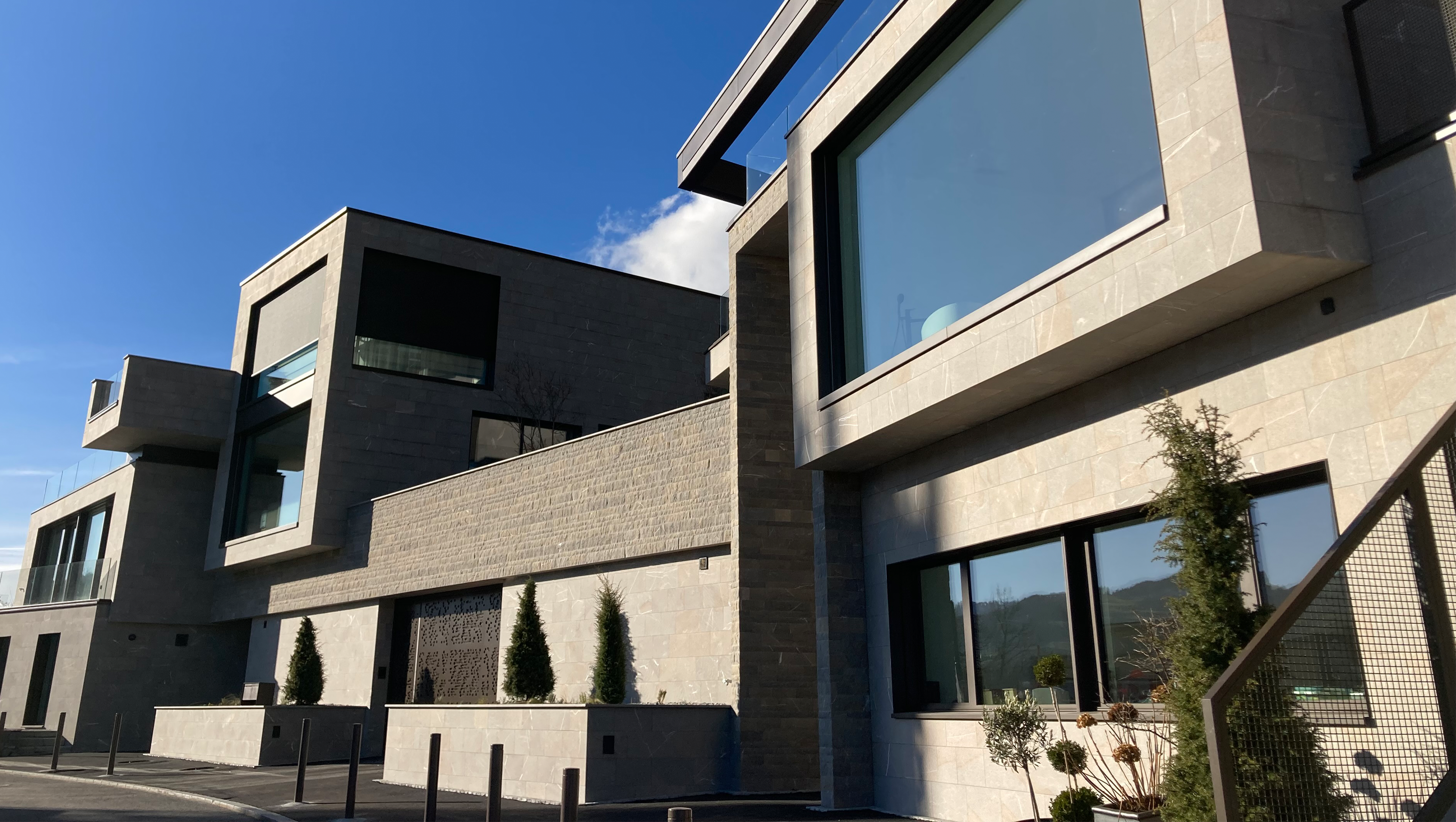
3D facade configurator software for Saint-Gobain Weber
3D Configuration | Surface Library | Rule-based System Logic
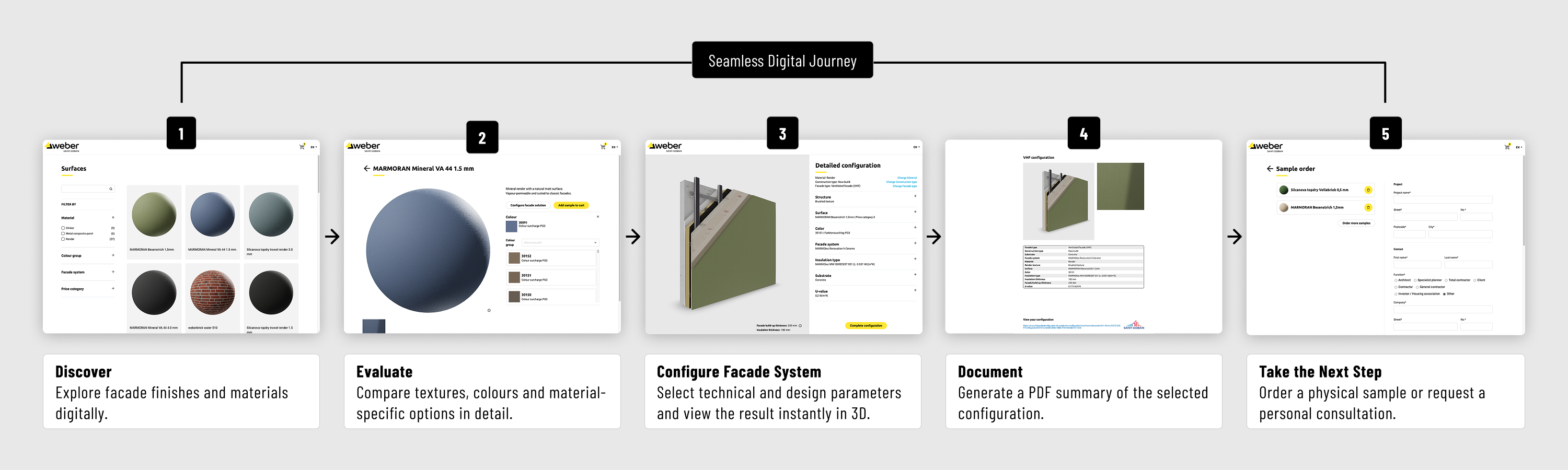
When planning a facade, technical requirements and a wide range of design options must be taken into account. Sitewerk has therefore developed a 3D facade configurator with an integrated surface library for Saint-Gobain Weber AG. The application enables professional users to explore and compare surfaces and, based on this, configure complete facade systems using up to nine dynamic parameters. A predefined set of rules guides users through the selection process, while the parametric 3D model immediately visualizes the chosen configuration. This creates a seamless digital process that spans from initial orientation through material selection and system configuration to the creation of PDF documentation, a sample order, or a consultation request.
Challenge: Technical Complexity Meets Material Diversity
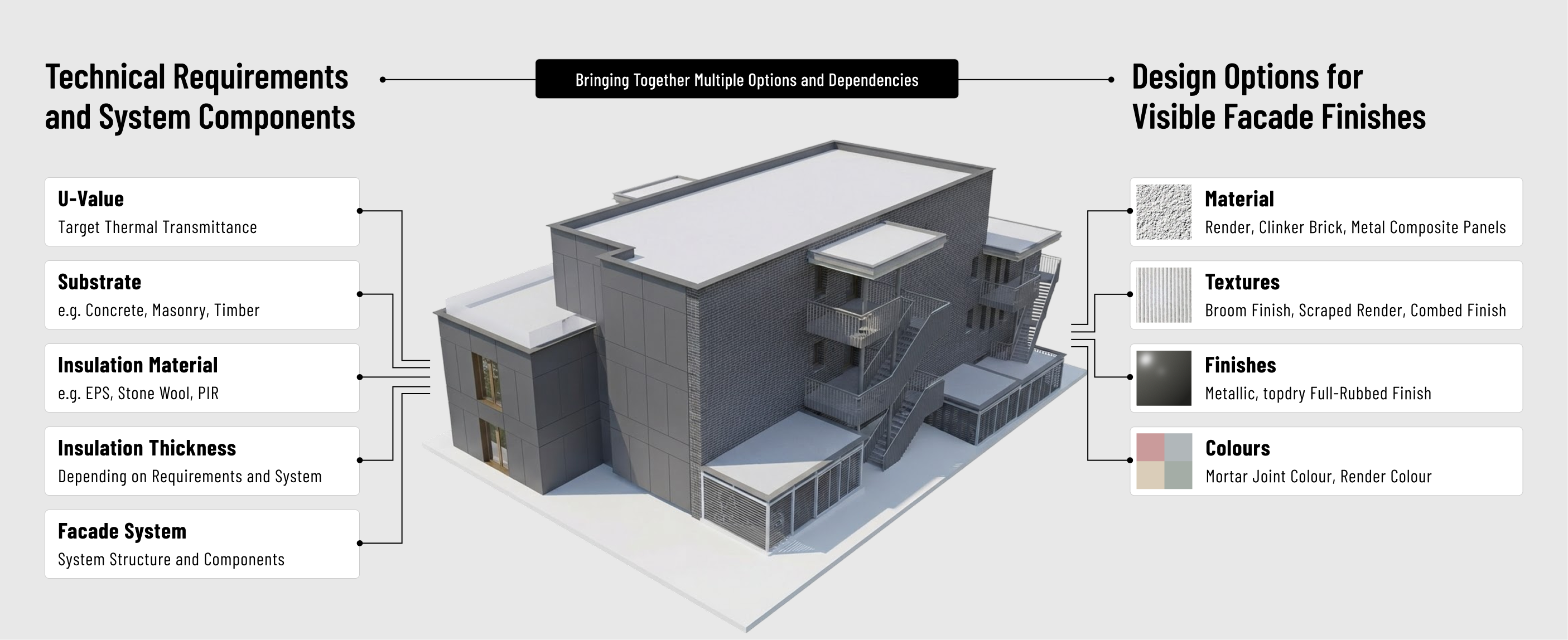
Facades consist of several coordinated layers. Depending on the project, various factors—such as the facade system, the insulation material, the insulation thickness, the substrate, and the U-value—influence which combinations are technically feasible. At the same time, there is a wide selection of materials, finishes, and material-specific options available for the visible design of the facade. This results in a wide variety of technical and design possibilities for architects, specialist planners, and other stakeholders. This diversity makes both the planning of a suitable facade system and the selection of the appropriate surface a challenging task. Physical samples have traditionally played an important role in evaluating the different materials and surfaces. However, as the variety of options increases, this approach reaches practical limits: Not every possible combination can be produced and kept on hand as a separate sample. At the same time, digitizing all variants individually would involve considerable effort. Therefore, a solution was sought that would map technical system dependencies and the variety of surfaces within a single digital process. Rather than merely providing facade visualizations, the application was designed to guide users from material selection through to the technically permissible configuration of a complete facade system.
The Main Benefits
Visual and Technical Planning in a Single Process
Only valid combinations
Scalable Variety of Interfaces
Seamless User Journey
Discover & Evaluate Surfaces Digitally
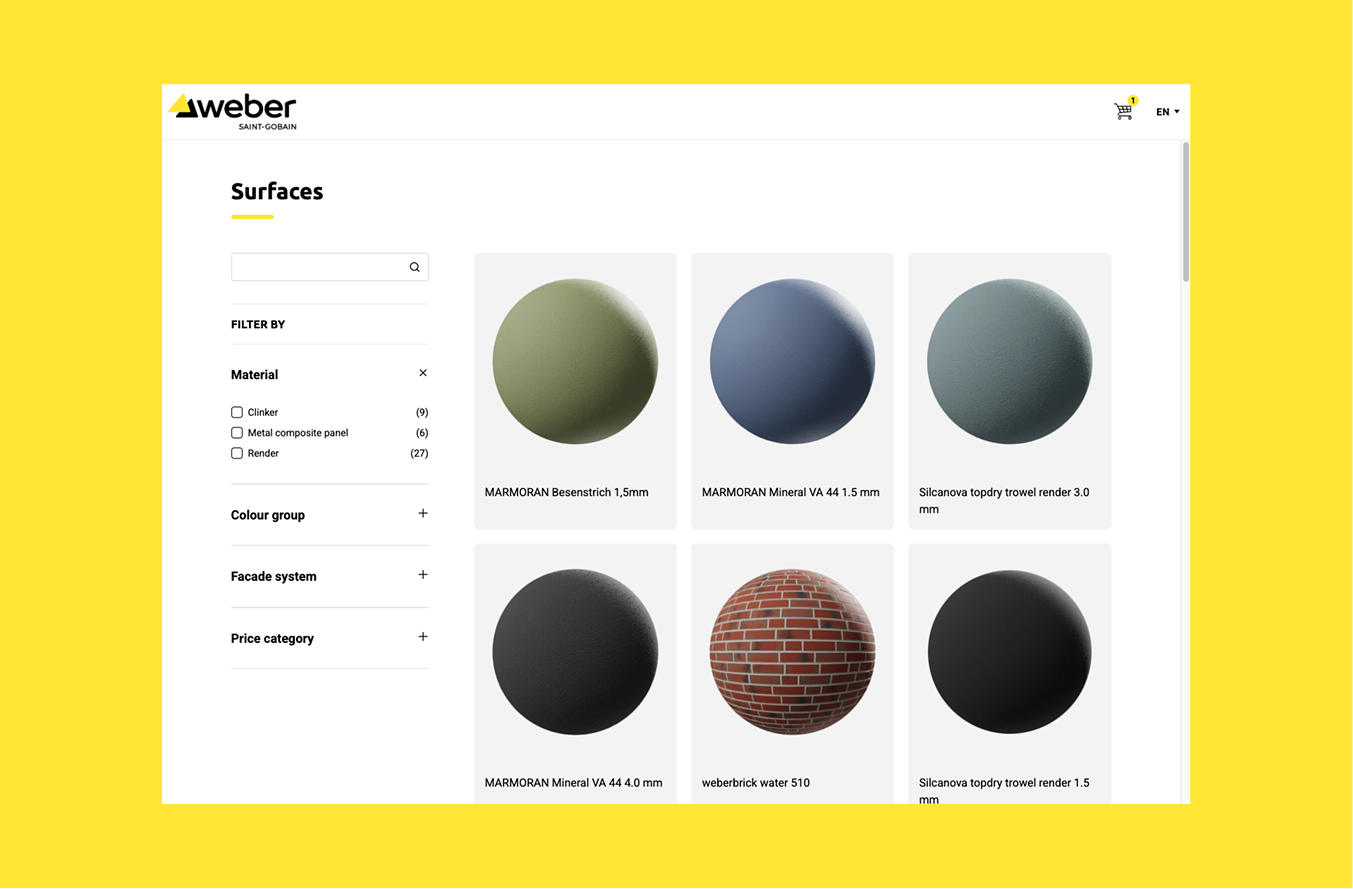
The Surface Library is Saint-Gobain Weber’s digital showroom. Plaster, clinker, and metal composite panels can be filtered and viewed in high detail. The 3D rendering with light and shadow helps users better assess the characteristic properties of the surfaces, such as texture, grain size, and reflectivity. Depending on the material, additional variants are available. Plaster surfaces, for example, can be displayed in different colors. For clinker bricks, the laying pattern and joint color can also be changed. A selected surface can be transferred directly to the facade configurator. Conversely, users can switch back from an existing configuration to the detailed view of the selected surface.
About 400 colors from a single base texture
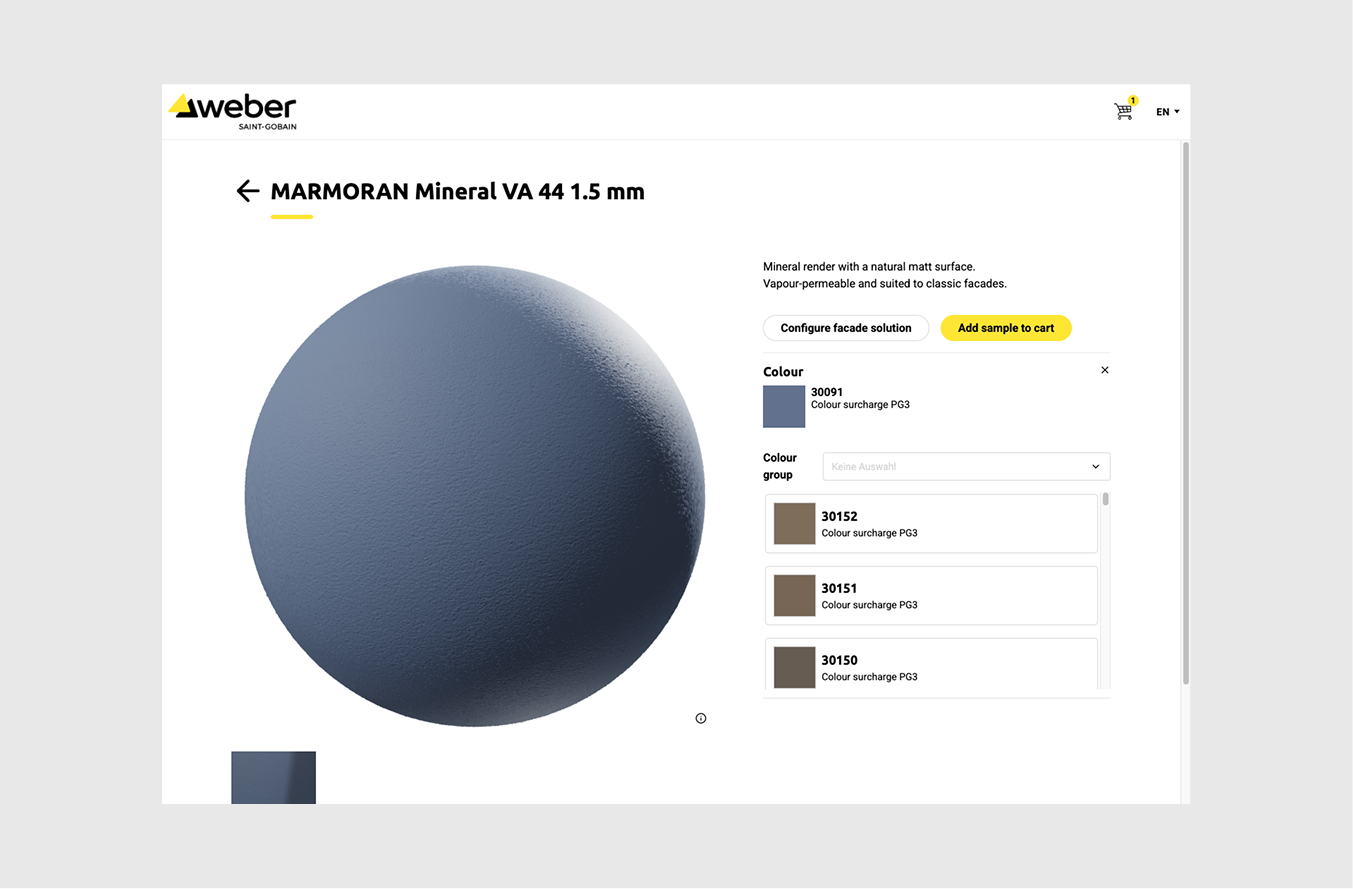
The wide variety of colors available for plaster surfaces posed special challenges for digitization. It would be virtually impossible to scale the process of creating a physical sample for every combination of texture and color, scanning it at high resolution, and integrating it separately into the application. For this reason, a neutral-colored base texture is digitized once and then digitally colored. On this basis, a plaster texture can be rendered in approximately 400 colors. This allows for a wide variety of variants to be digitally represented while simultaneously reducing the effort required to produce and digitize individual color variants.
Configure Complete Facade Systems in 3D
The facade configurator allows users to do more than just choose the visible surface. Users configure the structure of the entire facade system step by step. Up to nine dynamic parameters influence the configuration and are immediately visible in the parametric 3D model. These include, for example, the U-value, the type of substrate, the facade system, the insulation material, and the visible surface. The selected requirements give rise to additional parameters, such as the required insulation thickness. For the surface, options include stucco, clinker, or metal composite panels, along with their respective variants. The result is not a static visualization. The 3D model reacts immediately to the selected parameters and makes the resulting facade structure visually comprehensible.
«For us, the greatest added value lies in the fact that we can make facade solutions tangible and comparable much earlier in the project. Architects, in particular, can align materiality and design with the right system solution, enabling them to make well-informed and confident decisions more quickly.»
Dominic Kuoni, Facade Market Segment Manager
Rule-based configuration instead of a confusing array of options
The technical complexity of the facade system is modeled in the software through rules and dependencies. This logic defines which options within a system can be combined with one another. If a parameter changes, the available options adjust dynamically. Users can therefore only select combinations that are permitted according to the defined set of rules. This is precisely where a key strength of digital product configurators lies: the complex product logic is handled in the background, while users are guided step by step through the relevant decisions. The software of the 3D facade configurator also links this logic to the visual level: What should the facade look like, and how must the corresponding facade system be constructed?
From Material to Facade System—and Back Again
The surface library and the facade configurator are intentionally integrated with one another. Anyone who discovers a suitable surface in the digital showroom can import it directly into the facade configurator. Conversely, it is possible to switch from a configured facade system to the selected surface and evaluate it again in high detail. Once the process is complete, the configuration can be saved as a PDF. A physical sample can be ordered, or a personal consultation can be requested. The application can be used independently online. At the same time, it can be used as an interactive consultation and demonstration tool during face-to-face meetings with customers or at trade shows. This creates a seamless digital journey.
A Carefully Balanced Combination of Detail Quality and Performance
The surface library and the interactive facade model place different demands on visualization. In the surface library, the focus is on detailed material evaluation. High-resolution textures are used for this purpose to make material-specific details and surface differences visible. In the facade configurator, high-performance live interaction is also crucial. Optimized textures are used there so that the parametric model can respond quickly to changes. This allows the display quality to be specifically tailored to the respective use case: a high level of detail for material evaluation and high-performance 3D rendering for configuration.
A Flexible Foundation for New Surfaces and Variations
Surface management is decoupled from the parametric 3D model. This makes it possible to add new textures and activate or deactivate existing variants without having to completely adjust the facade model every time a change is made. This creates a flexible technical foundation on which Saint-Gobain Weber can continue to expand its digital material library and user journey.
Technology bridges the world of materials and system logic
For the 3D facade configurator software, various specialized components were integrated into a single, unified experience.
- ShapeDiver renders the parametric 3D model of the facade system. Changes to the relevant parameters are thus immediately visible in the displayed facade structure.
- Reawote digitizes physical material samples into high-quality textures, thereby laying the foundation for detailed surface rendering.
- Sitewerk connects the components within the application and is responsible for the user experience, the interface library, texture logic, rule-based configuration, and the integration of advanced features such as PDF summaries, sample orders, and consultation requests.
The technical implementation thus combines two distinct requirements: high-quality material rendering and a high-performance, rule-based configuration of the entire facade system.
«For us, transformation isn’t simply about digitizing existing processes. With the facade configurator, we’re creating a new way to access our facade solutions and evolving the way we advise customers and plan projects together. With Sitewerk, we had a strong partner to help us translate our technical expertise into an intuitive digital solution.»
Dominic Kuoni, Facade Market Segment Manager
A digital channel for planning, consulting, and sales
The solution provides architects, planners, and other users with centralized digital access to materials, finishes, and facade systems. Visual decisions and technical requirements can be considered within the same process. For Saint-Gobain Weber AG, the surface library complements physical sample displays with a digital showroom. The facade configurator guides users from inspiration to a specific system configuration and on to a PDF, sample order, or consultation request. The application can thus be used independently or to support in-person sales and consulting during client meetings or at trade shows.
About Saint-Gobain Weber AG
With nearly 200 production facilities in 62 countries, Weber is the world’s leading provider of mortar-based system solutions and part of the Saint-Gobain Group, one of the world’s most established and innovative industrial groups. Weber specializes in complete systems for energy-efficient facades, floor coatings with ultra-fast Mix-Mobil application, construction chemical leveling and waterproofing systems, as well as mortar and concrete products for a wide range of applications. In Switzerland, where over 80 percent of its products are developed and manufactured for the local market, the company holds leading market positions. Through solutions for reducing CO2 emissions, the use of sustainable raw materials, and short transport routes, Weber is committed to sustainable construction that benefits both people and the planet.
Weber offers a comprehensive range of services, extending from planning through to construction. The range of system solutions includes more than 4,000 products for new construction and renovation projects. These include brands such as MARMOtec Ceramo, MARMOtec Classic, and MARMOTtec Organo, which contribute to improved building performance in the construction of compact, rear-ventilated, or combined facades and enable a wide variety of design and installation options.
In the development, production, and marketing of all Weber mortar-based solutions, performance and sustainability are always top priorities. In this way, Weber contributes to the Saint-Gobain Group’s shared goal of making the world a better and more sustainable place to live, in keeping with its purpose, “MAKING THE WORLD A BETTER HOME.” ch.weber
Making Complex Product Systems Digitally Configurable
When products consist of numerous variants, technical dependencies, and visual decisions, more is needed than just product visualization. Sitewerk develops custom configurator software that combines product logic, user experience, and 3D visualization into a seamless digital process.
FAQs About the 3D Facade Configurator Software
- What does 3D facade configurator software do?
A 3D facade configurator software combines the selection of facade system components with interactive visualization. In the project for Saint-Gobain Weber, up to nine dynamic parameters influence the facade design. Changes are immediately reflected in the parametric 3D model.
- How can a complex facade system be configured digitally?
To do this, the relevant components, parameters, and technical dependencies must be digitally modeled. At Saint-Gobain Weber, for example, the configuration takes into account the U-value, substrate, facade system, insulation material, and visible surface. A predefined set of rules determines which combinations are available.
- How does facade configurator software prevent invalid combinations?
The technical dependencies are stored as rules within the software. If a user changes a parameter, the available options adjust dynamically. As a result, only combinations that comply with the stored set of rules are available for selection.
- How can facade surfaces be visualized digitally?
High-resolution textures make characteristics such as texture, grain, and reflectivity digitally visible. A 3D rendering with light and shadow aids in the evaluation. Depending on the material, colors and characteristics such as installation method or grout color can also be varied.
- How can a wide range of color variations for a facade surface be efficiently rendered digitally?
Not every color variation needs to be digitized as a separate physical sample. In the project for Saint-Gobain Weber, a neutral-colored base texture for plaster is digitized and then rendered in approximately 400 colors. This makes it possible to represent a wide variety of options based on a single base texture.